Offscroll Download on theApp Store
Screen time app & app blocker for iPhone

Pause before you scroll.

Offscroll puts a gentle moment of intention between you and the apps that eat your day. Open a distracting app and you breathe, hold or retype first, then decide if you really want in. Stop doomscrolling without quitting your phone.

  • Free to download
  • Built on Apple Screen Time
  • Private, on-device
An illustration of Offscroll's pause.
Why scrolling runs away with you

You didn't decide to stay. The feed decided for you.

Most people don't choose a long session; they drift into one. Feeds are built to serve the next hit, and reaching for your phone becomes a reflex before it is ever a choice.

  1. 01You open the app.

    Just to check one thing. A notification, a message, a minute of nothing.

  2. 02One reel becomes another.

    The feed never ends, so there is never a natural moment to stop.

  3. 03Your evening is gone.

    Not because you wanted it that way, but because nothing asked you.

You don't need more willpower. You need better defaults.

How Offscroll works

An app blocker that asks, instead of slamming the door.

Offscroll doesn't take your apps away. It adds just enough friction to break the reflex, so opening one becomes a decision again.

1

Choose the apps and websites that pull you in.

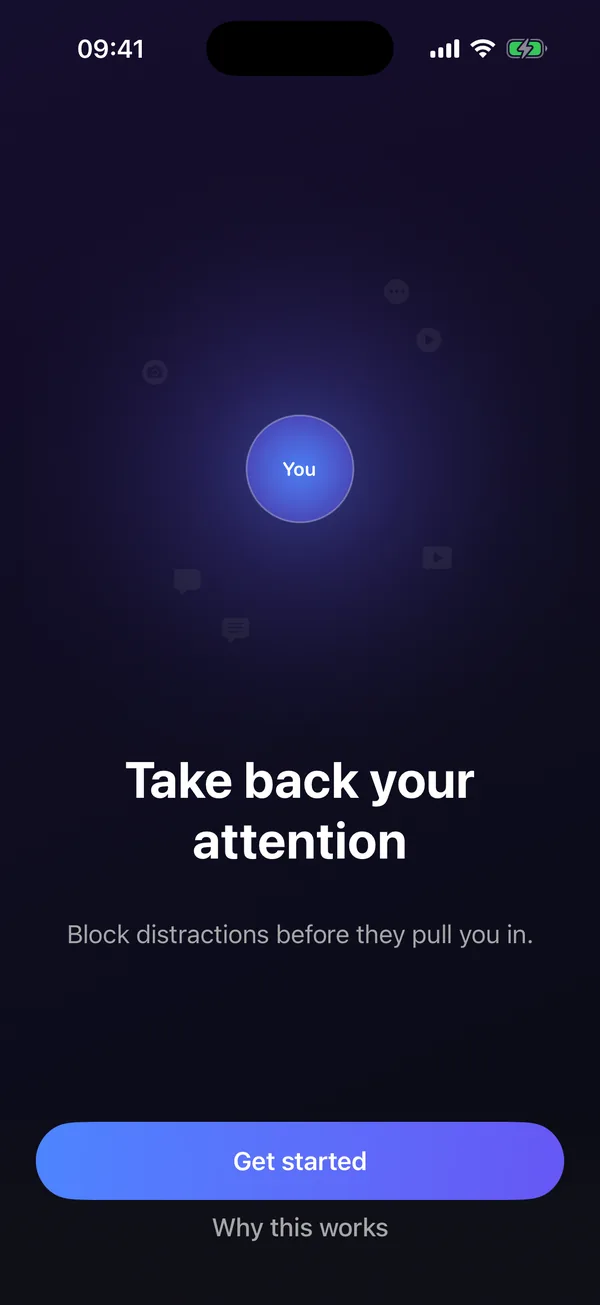
A personalized onboarding measures your scrolling time, shows you what it is costing you, and helps you set a realistic goal.

Then pick the apps and websites to protect. Offscroll is built on Apple Screen Time (Family Controls), so blocking runs through iOS itself and stays reliable.

Offscroll onboarding screen: Take back your attention. Block distractions before they pull you in.
2

Open one, and meet a pause first.

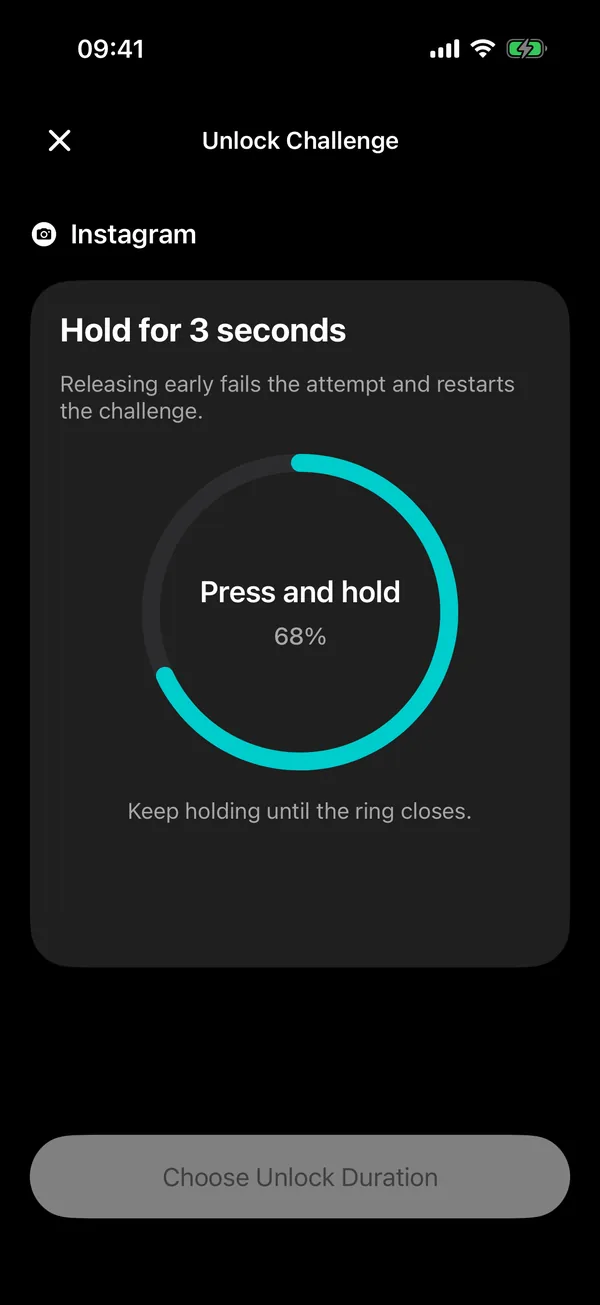
Instead of the feed, you get a short, intentional step: a guided breath, a pause, or a small challenge like holding your finger down until a ring closes. Release early and the challenge restarts.

It takes seconds. That's the point: long enough for the autopilot to switch off, short enough that it never feels like punishment.

Offscroll unlock challenge for Instagram: hold for 3 seconds, with a teal progress ring at 68 percent.
3

Unlock on purpose, for as long as you choose.

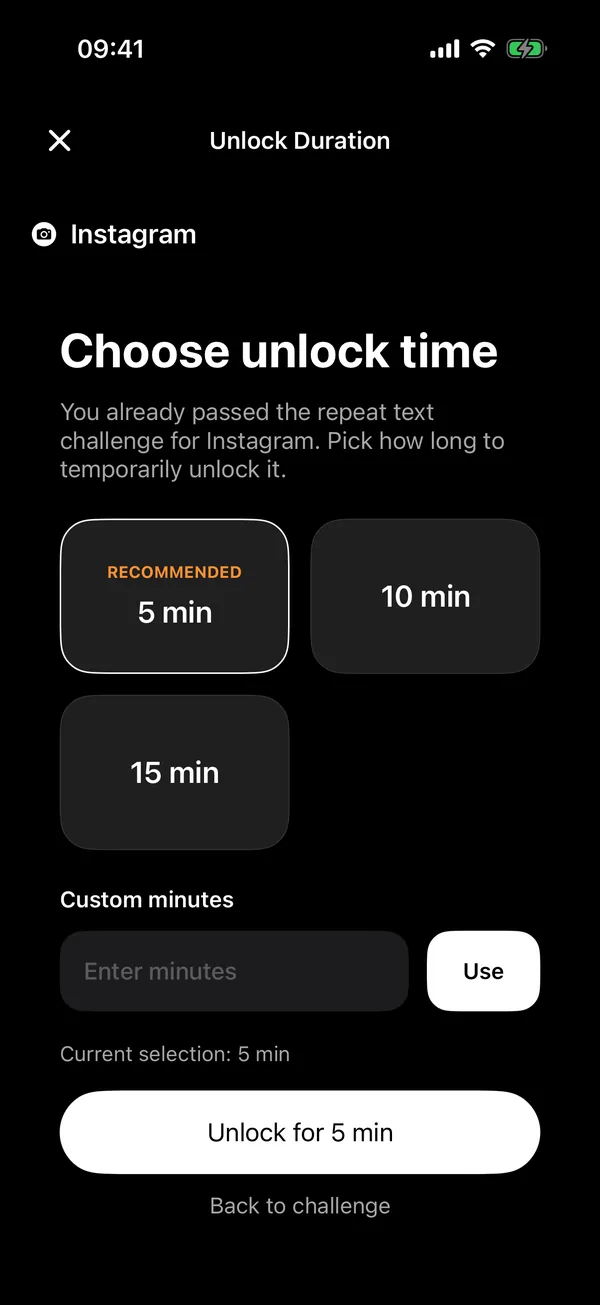
Passed the challenge? Pick how long you want the app for. Custom unlock durations let you tailor the friction without fully giving up access: a few minutes to reply to a message, or a number of minutes you type in yourself.

  • 5 min
  • 10 min
  • 15 min
  • Custom minutes
Choose unlock time screen in Offscroll with 5 minutes recommended, 10 and 15 minute options, and a custom minutes field.
Mindful unlock challenges

Pick your pause. Try one right here.

Each challenge adds a small, deliberate step before a blocked app opens. A guided breath is the gentle place to start.

Breathe

Complete a slow, guided breath before unlocking. The calmest way to defuse the urge.

Ready

Hold

Press and hold for 3 seconds until the ring closes. Let go early and it starts over.

0%

Retype

Type a short phrase exactly as shown. Hard to do on autopilot, easy to do on purpose.

Pause before opening this app.
 

Wait

Stay in the unlock flow until a countdown finishes, and give the urge time to pass.

0:10

These are simplified versions for this page; the wait is shortened.

Dashboard & weekly stats

See the time you take back.

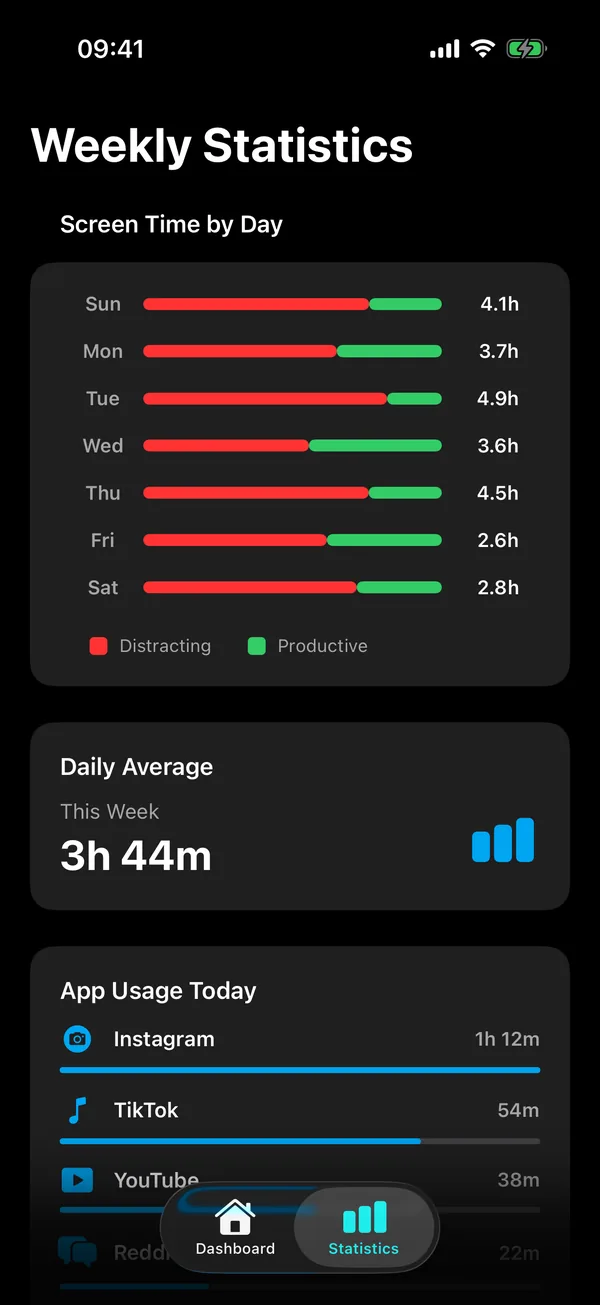
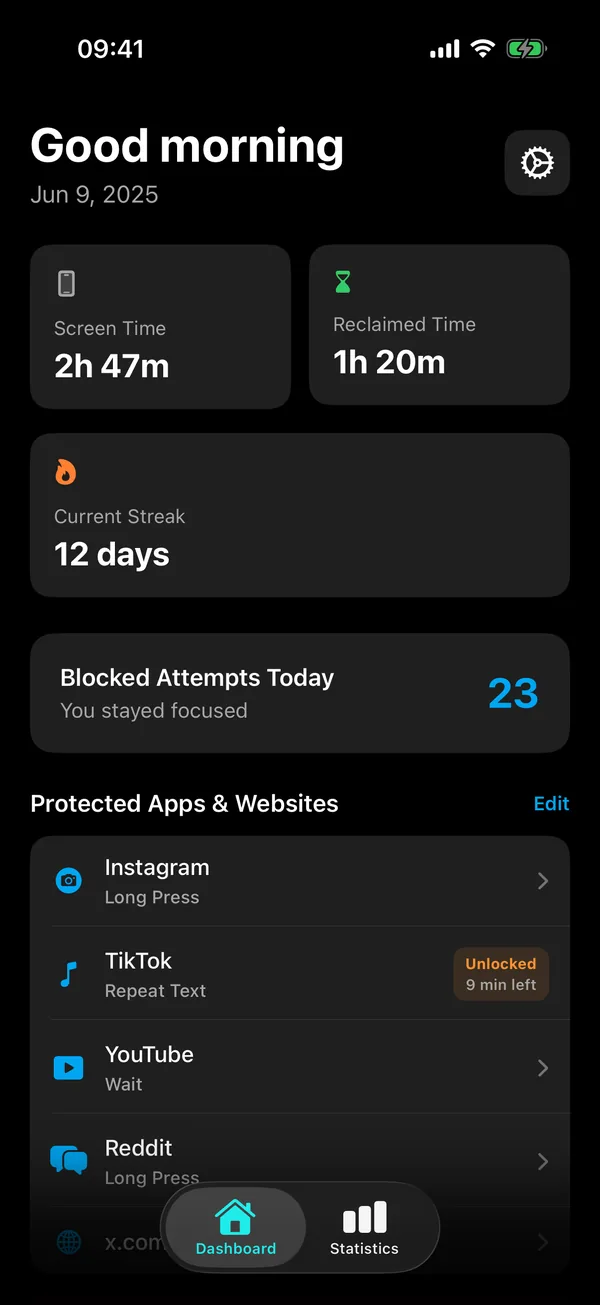
Reducing screen time is easier when you can see it move. Offscroll tracks your usage, your unlock attempts and your trends, so progress shows up week over week.

  • Weekly statisticsScreen time by day, your daily average and app usage at a glance.
  • Unlock attemptsSee how often you reached for a protected app, today and across the week.
  • Streaks and simple rewardsSmall wins that reinforce purposeful days, one after another.
Offscroll weekly statistics: screen time by day split into distracting and productive time, a daily average, and app usage today.
Offscroll dashboard with screen time, reclaimed time, a 12-day streak, blocked attempts today, and protected apps and websites, each with its own unlock challenge.

Private and on‑device. Nothing leaves your phone.

Your habits are your business. Offscroll works on your iPhone with Apple's Screen Time framework, and no data leaves your phone.

Built on Apple Screen Time

Blocking runs through Family Controls, Apple's own system for app and website limits.

One setting to turn on

Offscroll requires Screen Time to be enabled in Settings, then walks you through the rest.

Made for focus, not abstinence

For students, knowledge workers and creatives who want to reclaim focus without quitting their phone.

Free and Premium

Start free. Go further if it helps.

Offscroll

Free to download on the App Store. Start with the app that costs you the most time: put a mindful pause in front of it, choose your unlock durations and follow your stats.

Offscroll Premium

An optional auto-renewable subscription, monthly or yearly, each with a free trial. It unlocks:

  • Unlimited app & website protection
  • Category blocking
  • Repeating focus schedules
  • Every unlock challenge

Payment is charged to your Apple Account at confirmation of purchase. Your subscription renews automatically unless canceled at least 24 hours before the end of the current period. Manage or cancel anytime in your Apple Account settings. Terms of Use (EULA).

FAQ

Questions, answered.

Is Offscroll free?

Offscroll is free to download. Offscroll Premium is an optional auto-renewable subscription that unlocks unlimited app and website protection, category blocking, repeating focus schedules and every unlock challenge. You can choose a monthly or yearly plan, each with a free trial, and manage or cancel it anytime in your Apple Account settings.

How does Offscroll block apps on iPhone?

Offscroll is built on Apple Screen Time (Family Controls) for reliable blocking. You choose the apps and websites to protect. When you open one, Offscroll asks for a short, intentional step first, then lets you unlock it for a duration you pick. Screen Time needs to be enabled in Settings.

Can Offscroll block websites as well as apps?

Yes. Offscroll protects websites as well as apps, with custom unlock durations, so you can tailor the friction without fully giving up access.

Does my data leave my phone?

No. Offscroll is private and on-device. No data leaves your phone.

Which devices and languages does Offscroll support?

Offscroll runs on iPhone and iPad with iOS 26 or later. The app is available in English.

Do I have to quit social media to use it?

No. Offscroll is designed for students, knowledge workers and creatives who want to reclaim focus without quitting their phone. It adds a pause instead of a wall, so opening an app becomes a choice again.
Offscroll app icon

Turn autopilot into intention.

Reduce phone addiction one pause at a time. Offscroll is free on the App Store for iPhone and iPad.

Download on theApp Store